
AHS: American Home Shield
frontdoorBusiness
4.81.00K Reviews
- Version
- 2.34.31
- Installs
- 100.00K
- Age Rating
- Everyone
Screenshots

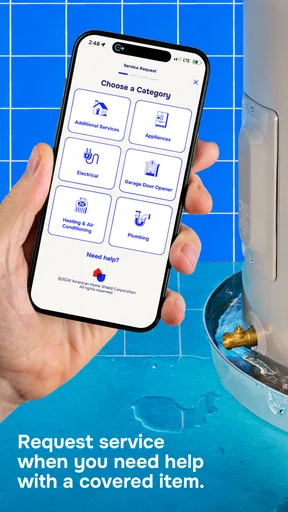
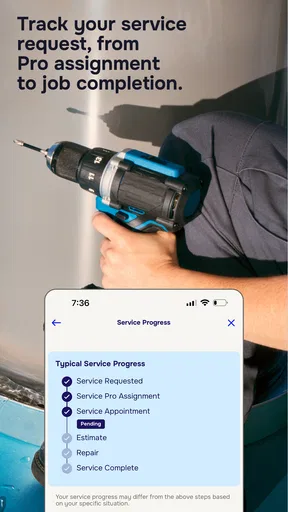
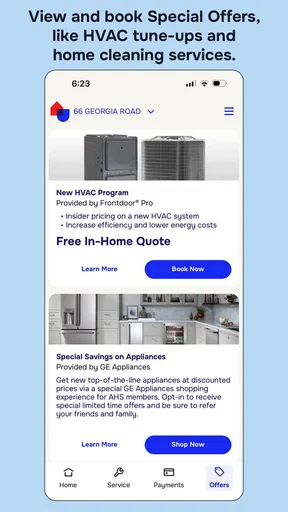
Our Review of AHS: American Home Shield
 Analysis by Appyee
Home repairs rarely become stressful because the problem itself is complicated. The real trouble is usually the chain of small tasks around it: remembering whether a covered item is still protected, finding the right service route, describing the fault clearly, and keeping track of what happens next. AHS: American Home Shield is a business app from frontdoor built around that home-warranty workflow. I found its main value in reducing the amount of searching and repeated explanation involved when an appliance or home system needs attention.
The app is free, aimed at everyone, and its focus is practical rather than entertaining. It is not a general home-maintenance notebook, a marketplace for comparing every contractor in your area, or a replacement for a full household budget. Instead, it gives American Home Shield customers a mobile place to manage warranty-related tasks. That narrower purpose is important: the app makes the most sense when your home is already connected to an AHS service relationship.
How AHS fits into the messy reality of home repairs
In my experience, the hardest part of a repair request is often starting it correctly. A broken air-conditioning system, a refrigerator that stops cooling, or a water heater that behaves strangely can all create the same question: who should I contact, and what information will I need? AHS: American Home Shield is designed to make that first step less scattered.
The developer, frontdoor, presents the app as the mobile side of America’s Best Home Warranty. That positioning explains both its strength and its boundaries. If you already use American Home Shield, having a dedicated app can be more convenient than searching through old emails, opening a browser, or calling while trying to remember account details. If you do not have a warranty relationship with AHS, the app is unlikely to become a useful everyday tool on its own.
What I appreciate is the way the app turns a vague household problem into a service task. Instead of keeping the issue in your head as “the oven is acting up,” you can approach it as something to report, follow, and revisit. That change sounds small, but it matters when you are busy, away from home, or handling a repair for someone else.
The audience response also suggests that this approach is landing well. The app holds a 4.8 average from around 15 thousand ratings, with roughly a thousand written reviews, and it has passed 100 thousand installs. Those figures do not guarantee a perfect experience for every account, but they indicate that the basic mobile workflow is useful to many people.
The first setup is about access, not customization
My advice is to install the app before something breaks, not during the emergency. The useful preparation is making sure you can sign in and recognize the home or account connected to your coverage. When a repair is urgent, the last thing you want is to discover that your account information is stored in an old message or that another household member is the person who normally handles requests.
Once access is ready, take a moment to understand where service activity appears and how you return to an existing request. This is one of the less obvious benefits of using a dedicated warranty app: it can give you a repeatable place to look. You do not have to reconstruct the history of a repair from memory every time you need an update.
I would also keep a short note about the appliance or system before submitting a request. Include the room, the visible symptom, when it started, and anything you already tried. This is not a substitute for the app’s own process, but it can make your description clearer. A technician benefits from “the upstairs unit runs but does not cool” more than “air conditioning broken,” and the same principle applies to appliances.
Another useful habit is separating the symptom from your guess about the cause. The app is a service-management tool, not a diagnostic laboratory. Reporting what you observe helps avoid locking the request to an incorrect assumption. If a dishwasher leaves water behind, describe that result rather than confidently labeling the pump as defective unless you actually know that.
Everyday situations where the app earns its place
Consider a weekday evening when the refrigerator starts warming up. You may not have time to search for a repair company, compare unfamiliar contact details, and explain your coverage from scratch. With the AHS app already available, the practical advantage is having a familiar channel for beginning the warranty process. The time saved is not necessarily the time spent filling in a form; it is the time avoided hunting for the correct next step.
A second scenario is a repair that does not finish in one visit. In that situation, the important question changes from “How do I report this?” to “What is happening with the request I already made?” A mobile record is more useful than relying on a paper note or trying to remember which conversation contained the latest detail. I found this especially valuable for households where one person submits the request and another person is home when service arrangements move forward.
The app can also help when you manage more than one property or a home that is not your primary residence, provided your account arrangement supports that situation. The benefit is organizational: a mobile service channel is easier to consult while traveling or coordinating with a family member than a folder of warranty documents. I would still double-check that you are working on the correct home before confirming anything, because speed is not helpful if a request is attached to the wrong place.
For renters, landlords, or relatives who share responsibility for a property, the key question is not simply whether the app opens. It is whether the person using it has the right account access and responsibility for the warranty request. The app may be convenient, but it does not remove the need to agree on who reports the issue and who follows up. Establishing that routine beforehand prevents duplicate requests and mixed messages.
Where the friction is genuinely reduced
The biggest improvement is centralization. A warranty issue can otherwise spread across phone calls, email threads, saved numbers, appointment reminders, and handwritten notes. A dedicated app gives the process a home on your phone. That is a simple idea, but it addresses the exact kind of administrative clutter that makes home repairs feel larger than they are.
Another advantage is availability at the moment you notice a problem. A phone is usually nearby when a washing machine stops, a range fails to heat, or a plumbing-related issue appears. Being able to begin the process from the same device you use to take a photo, check your calendar, or message a household member makes the workflow feel more natural than switching between several unrelated tools.
There is also a psychological benefit to seeing a request as an active task rather than an unresolved worry. I do not expect the app to repair anything by itself, but it can make the status of the service process easier to revisit. That distinction matters: the app reduces administrative friction, while the actual repair still depends on coverage, scheduling, diagnosis, and the service outcome.
A practical tip is to use the app as the primary record while keeping important supporting details elsewhere when necessary. If you have a model number, a photo of a display code, or a note about when the fault began, retain it until the issue is complete. The app can organize the request, but good documentation still comes from the homeowner. This combination is more reliable than expecting any service app to remember every detail for you.
I also prefer submitting one carefully described request over several rushed attempts for the same problem. Duplicate reports can make it harder to understand which request is current. Before starting again, check whether the original issue is already visible in your account. That small pause is one of the easiest ways to keep a repair history clean.
What the app cannot solve for you
The first limitation is built into the product’s purpose: this is not a universal repair app. It is most useful to people dealing with American Home Shield coverage. Someone looking for do-it-yourself instructions, independent contractor research, maintenance reminders, or a complete inventory of household equipment should choose a different type of app, or use a combination of tools.
The second limitation is that convenience should not be confused with guaranteed coverage. Starting a request in a polished mobile interface does not automatically mean every repair, part, condition, or expense will be handled in the way you expect. Before relying on the app during a serious household problem, I would still read the terms of your own warranty plan and understand the relevant service process. The app is a route into that relationship, not a replacement for it.
There is also a human element that software cannot remove. A request may need clear information, an available appointment, access to the home, and cooperation from the person who can inspect the equipment. If the issue is urgent or creates a safety risk, waiting for a normal digital workflow may not be appropriate. The app helps with organization, but it should not be treated as emergency assistance.
People who dislike account-based service systems may find the experience less appealing than calling directly. A phone conversation can feel faster when the situation is unusual and you need to explain several details at once. On the other hand, the app is better suited to people who want a written, repeatable place to begin and revisit a request. The better option depends on whether your priority is immediate human clarification or convenient self-service.
Version, compatibility, and the practical decision
The current version is 2.34.31 and it requires Android 10 or newer. That makes the app a reasonable fit for users with relatively recent Android phones, while owners of older devices should check compatibility before planning around it. I would not wait until a malfunction occurs to discover that the phone used by a parent, tenant, or property manager cannot install the app.
Because it is free, the decision is mainly about usefulness and eligibility rather than an upfront purchase. That does not mean the wider warranty service is free; the app itself is simply available without an app price. Keeping that distinction clear prevents an easy misunderstanding when deciding whether it belongs on your phone.
The age rating is Everyone, which matches the straightforward household-service purpose. The interface is aimed at ordinary account holders rather than technical professionals, and that is the right choice here. You do not need to understand appliance engineering to benefit from a tool that helps you report and organize a service issue.
After using it, I see AHS: American Home Shield as a focused utility rather than an essential app for every homeowner. It is strongest when you already rely on American Home Shield and want to cut down the time spent locating service information, repeating the same explanation, or wondering where a request stands. It is less compelling if you are shopping for a warranty, comparing unaffiliated repair providers, or hoping for detailed troubleshooting guidance.
My recommendation is simple: install it before you need it, confirm your account access, and treat it as a service organizer rather than a promise that every repair will be effortless. For the right household, that modest role is enough to make a frustrating process calmer. The app does not eliminate the cost, scheduling, or uncertainty that can come with home maintenance, but it can remove a layer of avoidable searching and paperwork. That is a worthwhile improvement when the refrigerator, heating system, or other major home equipment chooses the worst possible moment to fail.
Verdict
Strengths of AHS: American Home Shield
- Conveniently schedules covered repairs through the mobile app.
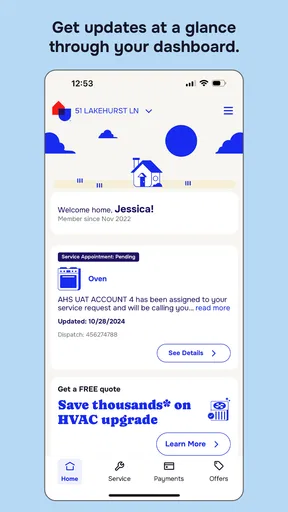
- Lets you track service requests and review appointment details.
- Provides access to plan information and coverage terms in one place.
- Useful for managing home warranty needs while away from home.
- Supports multiple service categories under a single membership.
Limitations of AHS: American Home Shield
- Coverage and service fees vary significantly by plan and location.
- Some claims may require waiting for an available local contractor.
- The app is less useful without an active AHS membership.
- Repair outcomes depend heavily on the assigned third-party technician.
- Certain appliances, systems, and pre-existing issues may be excluded.
Similar Picks in This Category
View All
LinkedIn: Community & Network
LinkedIn3.8

Zoom Workplace
zoom.com4.1

Microsoft Teams
Microsoft Corporation4.6

Meta Business Suite
Meta Platforms, Inc.4.6

Webex Meetings
Cisco Systems, Inc.4.5

TeamViewer Remote Control
TeamViewer4.4
Frequently Asked Questions
What is AHS: American Home Shield?
AHS: American Home Shield is a home warranty service app that helps members manage coverage for eligible household systems and appliances. After signing in, users can review their plan details, check service-fee information, request repairs, track existing claims, and access account or billing information. It is intended for customers with an American Home Shield plan rather than as a general home-maintenance app.
Can I request a repair through the AHS app?
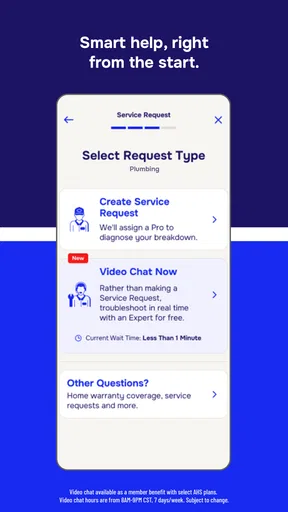
Yes, eligible members can generally use the app to submit a service request for a covered appliance or home system. You will typically need to describe the problem, select the affected item, confirm your property details, and choose an available appointment. Before submitting, review your contract because coverage exclusions, waiting periods, service fees, and claim limits may apply.
Does AHS cover every repair or replacement?
No. American Home Shield coverage depends on the specific plan, optional add-ons, contract terms, and the cause of the problem. Normal wear and tear may be covered for eligible items, while pre-existing conditions, improper installation, cosmetic damage, maintenance issues, or excluded components may not be. The app can show plan information, but the contract and claim assessment determine final eligibility.
Is the AHS: American Home Shield app free to download?
The app itself is generally available to download without a separate purchase, but using American Home Shield services requires an active home warranty plan and may involve monthly premiums, service-call fees, or other charges. Downloading the app does not automatically provide coverage. Check the current terms in your region and confirm pricing before enrolling or submitting a request.
Is my personal information secure in the AHS app?
The app may handle account credentials, property details, contact information, billing data, service requests, and appointment information. Use the official Android or iOS store listing, create a strong unique password, and keep the app updated. Before using it, review the current privacy policy and permissions. Never share verification codes or login details with someone claiming to be support.
